Categories

Saturday, 10 January 2015

MyAppSharer


Description

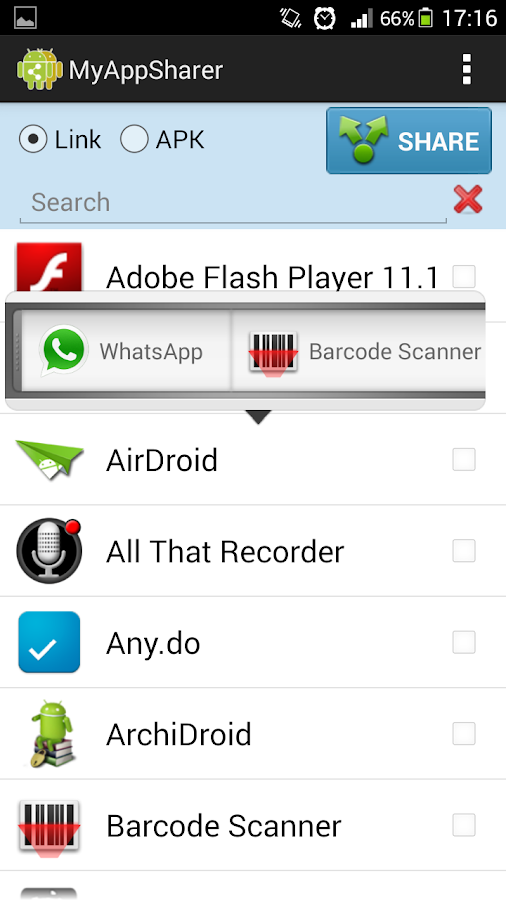
MyAppSharer let you to easy share your apps to your friends, you can share by link of Google play or directly share APK (App's full package).
MyAppSharer support many method to share your apps, you can share by message, Gmail, bluetooth, what's app, facebook, QR-Code, Dropbox etc..
By using the feature to export APK to SD card, you could backup your app to your SD card.
MyAppSharer also support share multiple apps at one time, and support instant search, easy to find your apps.
MyAppSharer - screenshot
* Nexus devices could not receive APK via Bluetooth, to workaround this issue, please use "Android Beam" or "Bluetooth(zip)" instead.
p.s.
1. You can install "Barcode scanner" to support share link by QR-Code.
2. Install "Dropbox" to support share APK to Dropbox.
3. If you like the app, you could donate the app from settings menu to remove Ad.
Disclaimer: Before share APK, please make sure you have the redistribution right.

CLICKHERE TO DOWNLOAD THE APP

Friday, 9 January 2015

Check Your Website with Integrity

Integrity is a fast, accurate and productive tool for checking your website. With this application you can easily locate your website’s broken links. The application also checks images as well as all the internal and external links. Integrity provides support for ‘soft 404s’and you can see any problems in an easy to view, colour at-a-glance interface. Integrity is OSX native, retina screen compatible and OSX Mavericks tested and supported.


A broken link on your site is a dead end for your visitors and will also be bad news for your search engine optimisation (SEO).
The following updates have been undertaken in this latest version of Integrity:
  • Handles images where src = “data:….”
  • Fixes bug which may have been responsible for a crash experienced by a very small number of users (crash characterised by ‘stack overflow’ in the crash report).
  • Internal changes to enable consistency with Integrity Plus.
  • Version numbering system of Integrity and Integrity Plus will be consistent.
Integrity requires Mac OSX 10.6 or higher, Intel 64-bit.

Friday, 26 December 2014

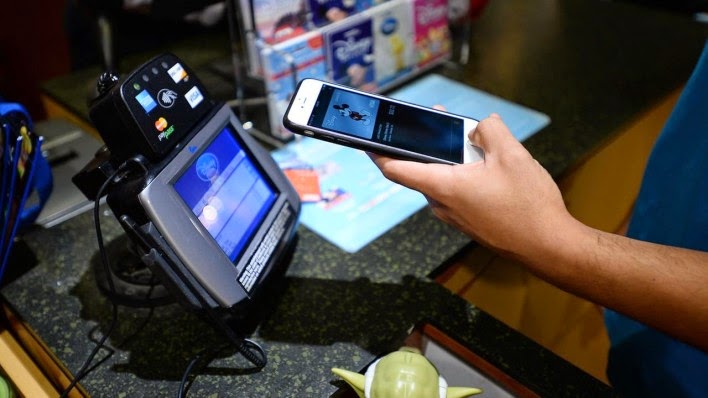
Disneyworld To Accept Apple Pay & Google Wallet

Walt Disney World is one place that my wife has always wanted to holidays. Personally, I don’t want to stand in the long queues or drive around endless parking lots. Bu,t one reason I have held off so far is the cash. I really don’t want to have to always pull out my wallet every two minutes. I know you still have to pay for goods and services, but I would rather use my phone than coins and paper.

The launch of Apple Pay and Google Wallet at Walt Disney World Resort is the first place Disney will use Apple Pay and Google Wallet, not to mention a number of other wireless payment systems,  in the near future. 

In the future additional Disney Stores and other Disney properties will follow suit in the use of mobile payments. This system will start with Disney’s RFID system, which is already in place, as part of their MyMagic+ brand.

Apple Pay and Google Wallet will be deployed to Disney Stores inside the parti, bars, quick-serve restaurants, and ticket sale booths first, according to WDMagic. Following this initial roll-out, sit-down restaurants inside the park will be added in the future.

Disney will be using the EMVCo system to accept payments like Apple Pay and Google Wallet. In order to identify locations inside their park, which use wireless payment systems, the EMVCo symbol will be displayed.

Check Out The U.S.S. Enterprise in Gingerbread

You know the holiday season is upon us when you start seeing iconic space vehicles recreated in gingerbread, specifically the U.S.S. Enterprise from Star Trek. I have to admit – I enjoyed the movies, but I was never much of a trekkie, but I think even I could get into this thing. It was created by some diehard fans who also happened to be in the cake business (Blackmarket Bakery), and their skill shows on every last piece. Besides being made out of gingerbread, it also includes just about every other sweet treat you can imagine, including: tic tacs, sour straws (jr. high memories, anyone?), and candy canes. Oh – speaking of candy canes, the gingerbread Enterprise is held in the air by a “candy cane beam” that makes it look like it’s hovering in the air.

Since I’m not much of a baker, it doesn’t take much to impress me, but this is seriously well done and deserving of everyone’s praise. It’s definitely one tasty treat I couldn’t bring myself to eat.
What do you think? Let us know in the comments section below!

Monday, 15 December 2014

Will the MIPS Creator CI20 Rival the Raspberry Pi?

The Raspberry Pi is synonymous with small, handy and really, really useful.  You can use one to power all manner of different computer related projects and gadgetry.  The Raspberry Pi is not alone in the market and maybe it’s time to move over and let someone else take the helm. The new guy on the block is called the MIPS Creator CI20 – and it is not to be sniffed at either.  In fact, it’s more, more, more. The board has a more powerful processor than the Raspberry Pi, it has more memory and more onboard storage too. For the graphics, the Creator CI20 uses a version of the Imagination chip, which is also found inside the iPad.


The Raspberry Pi has already sold almost four millions units, so the market is growing and is a competitive one. The CI20 will cost you £50 ($65) and it can be ordered now, although the first units are not ready to be dispatched to customers until January of next year.

Hertfordshire-based company, Imagination, is primarily a chip designer. They are better known for drawing up specifications for processors that are used to handle graphics in Apple’s gadgets and other manufacturers products, rather than making tiny computers like the Creator CI20. A spokesman for Imagination, Tony King-Smith, said the CI20 is aimed at people who want a “high-performance” board for their development projects.

Imagination is entering a crowded market that is full of machines such as the Raspberry Pi, the BeagleBone Black, Arduino Uno and Intel’s Galileo and NUC devices. So will the Creator CI20 succeed?

The Creator CI20 is capable of running many different versions of the open source OS Linux and it can also run the latest edition of Google’s Android mobile OS. Imagination’s offering also has a built-in Wi-Fi setup and Bluetooth for wireless data connectivity. The BeagleBone Black and Raspberry Pi B+ devices only have Ethernet connectors, so the Creator CI20 has a leg up on them. But even so, the Raspberry Pi may still have the edge, as the Creator CI20 is just a product, whereas the Pi had so much backing and educational potential that it almost seemed like it was a movement.
We shall have to wait and see how the Creator CI20 will pan out, but for £50, it’s still a bargain in anyone’s book.

Saturday, 6 December 2014

GoPro to Release Their Own Drone

The idea of capturing your own stunts and events has been at the forefront of the GoPro team since, well, they started really. GoPro is expanding from its business of making wearable video cameras. In line with the ever growing business of drones and drone related gadgetry, GoPro Inc. is developing  their own line of consumer drones. The company is planning to start selling miniature multi-rotor helicopters that are equipped with high-definition cameras late in 2015. The firm is allegedly aiming for a pricing structure around $500 and $1,000.

Consumers have come in the thousands to buy unmanned aircraft in recent years as technology advances have made them smaller, cheaper and easier to fly. In doing this, they are also  leaving regulators struggling to keep up to speed. The drone market is now mainstream and also very lucrative. The advent of a massive consumer name like GoPro being interested in the race is evidence of this.


The move into drones by GoPro is coming as the market-leading camcorder business is facing some stiff competition from rivals like Sony Corp. GoPro is a 10-year old company that went public in June and since then they have been investing in R&D in order to maintain the lead in the camera business.
The drone market is not something brand new to GoPro as the firm already provides many of the 3 oz. cameras, which consumer drones carry.
Interestingly SZ DJI Technology Co. of China has recently started to sell devices, which come with its own in-house camera and other drone makers may stop supporting GoPro devices if they are competing head-to-head with the camera maker.

A GoPro spokesman said in a recent email, the company’s users are already producing “jaw-dropping GoPro footage recorded from quad-copters…Earlier this year, to study the policy implications and to protect the rights of our users, GoPro joined the Washington-based Small UAV Coalition.” .

GoPro sells their cameras, which are priced $200 – $500 on the GoPro website and through retailers such as Best Buy. It is yet to be seen how the firm will market their new gadgets when they are ready to unleashed on the world


Tuesday, 4 November 2014

Make your Computer Welcome You

Do you watch movies? Have you always loved the way how Computers in movies welcome their users by calling out their names? I bet that you too would want to know how you can achieve similar results on your PC and have a computer said welcome.

Then you are at the right place, this article describes exactly how you can make your computer welcome you like this.

With this trick, you can make your Computer welcome you in its computerized voice. You can make your Windows based computer say "Welcome to your PC, Username."

Make Windows Greet you with a Custom Voice Message at Startup

To use this trick, follow the instructions given below:-

  1. Click on Start. Navigate to All Programs, Accessories and Notepad.
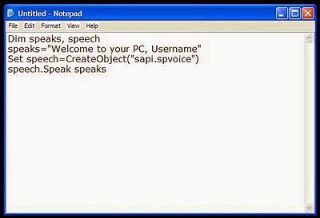
  2. Copy and paste the exact code given below.
Dim speaks, speech
speaks="Welcome to your PC, Username"
Set speech=CreateObject("sapi.spvoice")
speech.Speak speaks
     3.  Replace Username with your own name.
     4.  Click on File Menu, Save As, select All Types in Save as Type option, and save the file as Welcome.vbs or "*.vbs".
     5.  Copy the saved file.
     6.  Navigate to C:\Documents and Settings\All Users\Start Menu\Programs\Startup (in Windows XP) and to C:\Users\ {User-Name}\AppData\Roaming\Microsoft\Windows\Start Menu\Programs\Startup (in Windows 8, Windows 7 and Windows Vista) if C: is your System drive. AppData is a hidden folder. So, you will need to select showing hidden folders in Folder options to locate it.
     7.  Paste the file.


Now when the next time you start your computer, Windows will welcome you in its own computerized voice.

Note: For best results, it is recommended to change sound scheme to No Sounds.
You can change the sound scheme to No Sounds by following the steps given below:-
  1. Go to Control Panel.
  2. Then click on Switch to Classic View.
  3. Then Click on Sounds and Audio Devices.
  4. Then Click on the Sounds Tab.
  5. Select No Sounds from the Sound Scheme option.
  6. If you wish to save your Previous Sound Scheme, you can save it by clicking Yes in the popup menu.
  7. Click on OK