Categories

Showing posts with label Appsrzae. Show all posts

Monday, 19 October 2015

MX Player Pro v1.7.41. with Patched (DTS + AC3 Support)


THIS IS THE AD-FREE VERSION OF MX PLAYER.
MX Player - The best way to enjoy your movies.

a) HARDWARE ACCELERATION - Hardware acceleration can be applied to more videos with the help of new H/W decoder.
b) MULTI-CORE DECODING - MX Player is the first Android video player which supports multi-core decoding. Test result proved that dual-core device’s performance is up to 70% better than single-core devices.
c) PINCH TO ZOOM, ZOOM AND PAN - Easily zoom in and out by pinching and swiping across the screen. Zoom and Pan is also available by option.
d) SUBTITLE GESTURES - Scroll forward/backward to move to next/previous text, Up/down to move text up and down, Zoom in/out to change text size.
e) KIDS LOCK - Keep your kids entertained without having to worry that they can make calls or touch other apps. (plugin required)

Subtitle formats:
- DVD, DVB, SSA/ASS Subtitle tracks.
- SubStation Alpha(.ssa/.ass) with full styling.
- SAMI(.smi) with ruby tag support.
- SubRip(.srt)
- MicroDVD(.sub)
- VobSub(.sub/.idx)
- SubViewer2.0(.sub)
- MPL2(.mpl)
- PowerDivX(.psb)
- TMPlayer(.txt)
- Teletext
- PJS(.pjs)
- WebVTT(.vtt)
******

What's New
• Fixed subtitle download error while playing network media.
• Added Malayalam translation.
• Added an option for changing text style of last played media to italics under Settings > List > Theme
• Floating button on the list screen can be disabled optionally under Settings > List > Floating button
• Added an option for remembering playback screen selections for each files under Settings > Player > Remember selections. It is enabled by default.

This app has NO advertisements

Note:
Patched version, no Lucky Patcher or Google Play MOD needed!
Please remove all previous version and codec at first!!!
* Make a backup of your current version's data/setting (if necessary)
** Restore your backup data/setting (if necessary)


CLICK HERE TO DOWNLOAD

Tuesday, 3 March 2015

5 Google apps that will give Lollipop look to your phone

Google launched Android 5 aka Lollipop back in October, but so far only a handful of smartphones have been updated to it. Apart from the Google Nexus 6, only a handful of phones have appeared in the last few months running Lollipop right out-of-the-box and fewer have actually received an update to the OS.
However, the good news is that you don't actually need Lollipop on your phone to get the best features of Google's brand new operating system.
We show you how.

The Google Now Launcher
The Google Now launcher is central to the Lollipop like experience. Google has updated its launcher, which debuted back in 2013 when the company launched Android KitKat. The new launcher now adds the material design look and feel that can be found on Google's Nexus devices running Lollipop. The Google Now launcher also ensures that the Google Now contextual assistant is just a swipe away on the home screen. The launcher also adds an element of touch-less control, as users can operate many functions of the device using the 'Okay Google' hot command using speech. To use the launcher, you should at a minimum have a device with Android 4.1 Jelly Bean.
Download Google Now Launcher
Google Keyboard
Google has even updated its stock Android keyboard on the Play Store. The Google Keyboard now adds two themes called 'Material Dark' and 'Material Light'. When you start the keyboard, by default the keyboard will use the old 'Holo' theme, but you can change the theme of the keyboard to either of the new material design themes. Swift Key users can also use new material design themes, but they will need to buy the themes.

Download Google Keyboard

Google Camera
Google's Camera app is available on the Play Store and it provides a basic and simple camera interface for shooting photos. While it is not very comprehensive, you may prefer it over a feature-heavy camera app that most manufacturers use in the phones. Basically, it is the design thing. Otherwise, the third-party camera apps are better.

Download Google Camera

Gmail
Gmail was one of the first applications Google updated with material design. The Gmail app is pre-installed on most Android phones, though to get the new material design look, you may need to update the app from the Play Store. The new Gmail app also adds support for Exchange mail, which is very popular amongst corporate users.

Download Gmail


Messenger

The Messenger app is one of Google's newest apps. On Android Lollipop, the Messenger app replaces the stock Android SMS app. Chances are that your phone already comes with a SMS application, which is better than the old SMS app that Google provided, but still the Messenger app is a handy addition, which is aesthetically beautiful as it uses Material Design and is incredibly functional. Just make sure you don't mix up Google's Messenger app with the one Facebook makes as both have identical names. 
Download Messenger
Google Calender
Google Calender is a staple of Google's suite of apps. It is one of the best calendar apps available on Android. With Lollipop, it too has been updated with the Material Design language, which makes it an aesthetically pleasing calendar option for most users.
Download Calendar
Some core applications found on Android Lollipop running on Nexus smartphone are not available on the Google Play Store. These include the calculator, the clock and the Lock screen. While Google does not offer these apps, there some good options that even incorporate the Material Design language heralded in the new version of the OS.

The L-Locker

The L-Locker app mimics the look and feel of the new lock-screen that Google has added in Android 5.0. It even adds supports for Lollipop style notifications. Other than this, the app adds many new features, which are even missing in Android Lollipop.
Download L Locker
Calculator L
Calculator L adds a Lollipop style calculator, which uses Material Design like principles in its user interface design. The app is pretty straightforward and simple to use.

Download Calculator L

Clock L
Like Calculator L, Clock L strives to provide a third party clock that looks like the one Google has added in Android Lollipop on its Nexus smartphones. It is compatible with Android Ice Cream Sandwich plus smartphones and tablets and is also highly customisable.
Download Clock L
Other than this, like in the case of the Gmail app, you should update all your preloaded Google Apps, which include Google Search, Google Maps, Google+, Photos,  YouTube, Hangouts, and Google Play Music and Google Drive. Some of these apps will need an update to Google Play Services. Once updated all the apps will add the new look and feel that one gets on a Nexus smartphone running Android Lollipop.
Users can also download Google Doc apps รข€” Docs, Sheets and Slides for productivity. These apps are normally preloaded on Google's Nexus hardware, but for other devices they have to be manually downloaded.

Saturday, 10 January 2015

COMPASS

Description

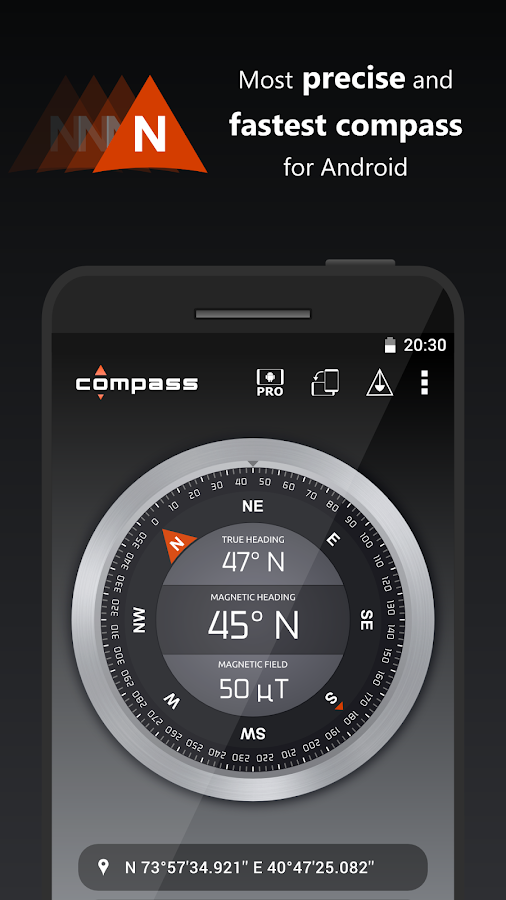
Compass is the most precise compass app available. It supports magnetic and true north calculated using network location or GPS coordinates. Furthermore this compass displays the location coordinates and the strength of the magnetic field to see if it interferes with the compass sensor. It supports high definition displays and can be installed on the SDCard. Download the best compass for free!


Compass - screenshot

PERMISSIONS:

GPS and network location:
Needed to calculate true north.

Internet Access:
Needed for downloading ads and for completely anonymous usage statistics. Usage statistics can be disabled in the settings of Compass

CLICK HERE  TO DOWNLOAD

WORD SEARCH PUZZLE GAME

Description

WORD SEARCH PUZZLEWelcome to the best application of soup for Android auto-generated letters:
1.- There are 7 items to choose from:
     - Animals
     - Countries of the World
     - Cities of the World
     - American presidents
     - Historical figures
     - Kids
- Trademarks
2.- Has three levels of difficulty:
     - Easy
     - Medium
     - Difficult
3.- Has two game modes:
     - List of words (words to find the slopes shown)
     - Remaining number of words (the number of words to find earrings shown)
4.- There are two methods of self-generation:
     - The maximum number possible (the board is filled with the maximum number of words)
     - Limited (the board is filled with a number proportional to the size of the words)
5.- Available in many languages:
     - Catalan
     - Spanish
     - English
     - Italian
     - French
     - Portuguese


Cover art

GAME

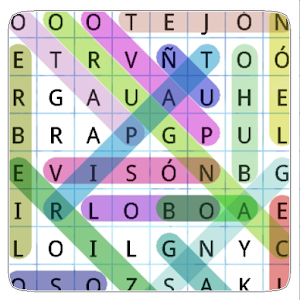
The board fits the screen size and..... you can already play.
Find the hidden words to find and are marked with different colors.

SCORE

Complete the game, calculates your score and stores your best times.

INFINITE GAME

Also, if you can not finish the game, do not worry, when you get back can choose to start a new game or continue the game as you left it.

CLICK HERE TO DOWNLOAD

MyAppSharer


Description

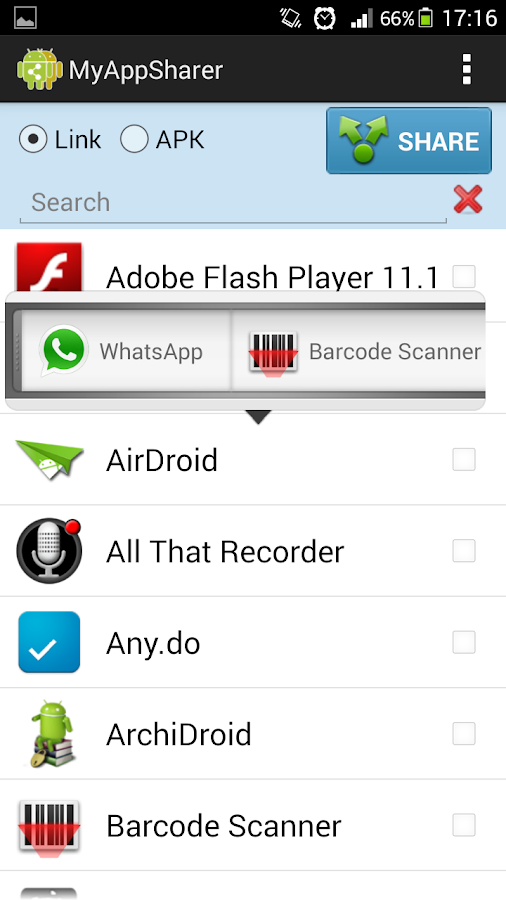
MyAppSharer let you to easy share your apps to your friends, you can share by link of Google play or directly share APK (App's full package).
MyAppSharer support many method to share your apps, you can share by message, Gmail, bluetooth, what's app, facebook, QR-Code, Dropbox etc..
By using the feature to export APK to SD card, you could backup your app to your SD card.
MyAppSharer also support share multiple apps at one time, and support instant search, easy to find your apps.
MyAppSharer - screenshot
* Nexus devices could not receive APK via Bluetooth, to workaround this issue, please use "Android Beam" or "Bluetooth(zip)" instead.
p.s.
1. You can install "Barcode scanner" to support share link by QR-Code.
2. Install "Dropbox" to support share APK to Dropbox.
3. If you like the app, you could donate the app from settings menu to remove Ad.
Disclaimer: Before share APK, please make sure you have the redistribution right.

CLICKHERE TO DOWNLOAD THE APP